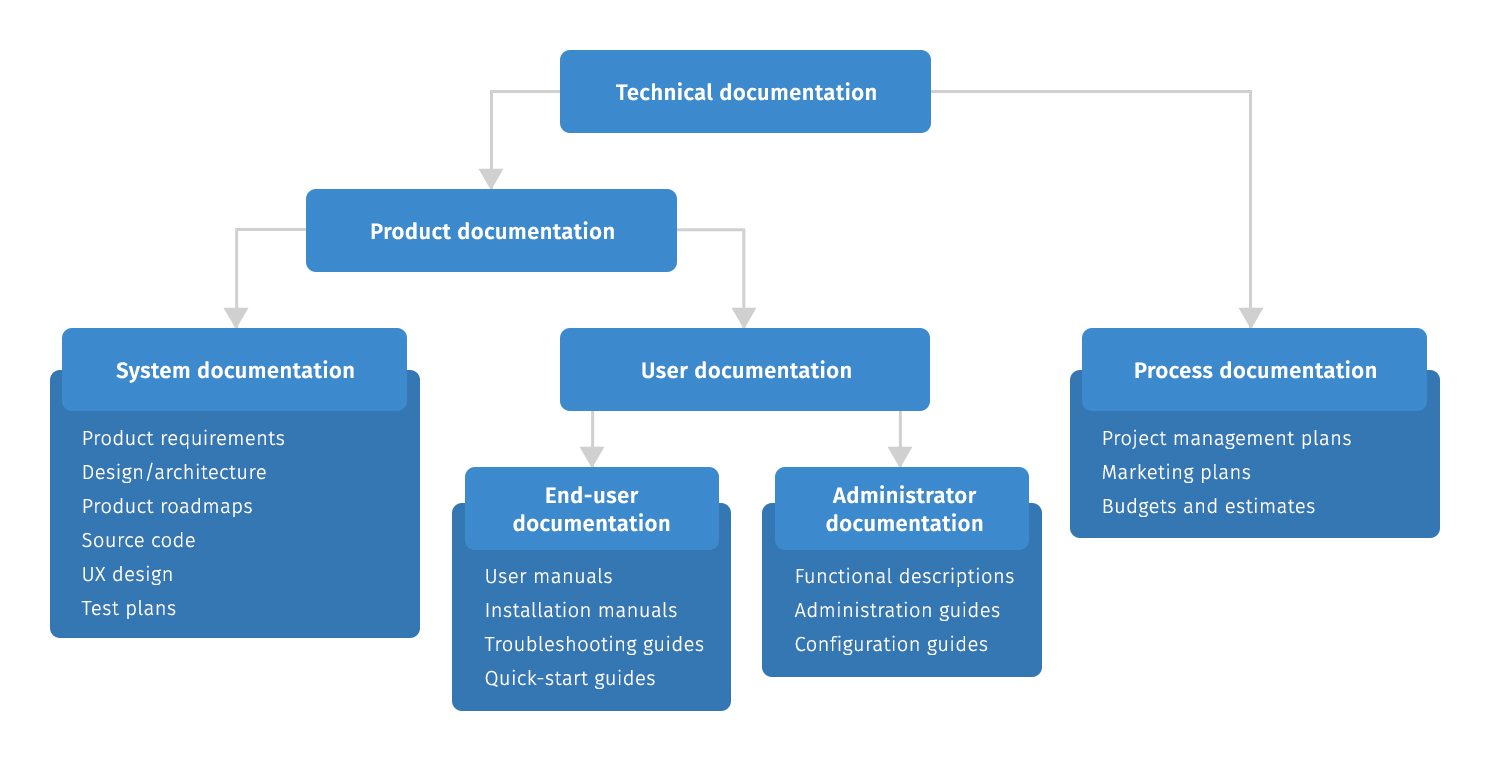
Introduction
Technical documentation software has become an essential tool for businesses that want to create, organize, and share accurate information. Whether you’re documenting software APIs, writing user manuals, creating knowledge bases, or maintaining internal procedures, the right platform can improve collaboration and keep information up to date.
Modern teams no longer rely on scattered documents or outdated PDFs. Instead, they use technical documentation software to centralize documentation, streamline updates, and make information easily accessible. This guide explains what technical documentation software is, why it matters, the features to look for, and some of the best solutions available today.
What Is Technical Documentation Software?
Technical documentation software is a digital platform designed to help individuals and organizations create, manage, and publish technical content. It supports documentation for software products, hardware, APIs, operating procedures, training materials, and customer help centers.
Unlike basic word processors, these tools offer collaboration features, version control, search functionality, templates, and publishing options that simplify documentation management.
Why Businesses Need Technical Documentation Software
High-quality documentation improves communication between teams and helps customers solve problems faster. Developers, support teams, and end users all benefit from organized documentation.
Some of the biggest advantages include:
- Faster onboarding for employees
- Better collaboration between teams
- Easier document updates
- Reduced customer support requests
- Consistent documentation standards
- Centralized knowledge management
As organizations grow, maintaining accurate documentation becomes increasingly important.
Key Features to Look For
Not every documentation platform offers the same capabilities. Before choosing a solution, consider features that match your organization’s needs.
Real-Time Collaboration
Multiple team members should be able to edit documents simultaneously without creating conflicting versions.
Version Control
Version history allows teams to track changes and restore previous document versions if necessary.
Powerful Search
A built-in search engine helps users quickly locate specific documents, guides, or instructions.
Templates and Formatting
Ready-made templates save time and ensure documentation remains consistent across projects.
Access Control
Permission settings help protect sensitive information by controlling who can view or edit documentation.
Integration Support
Many platforms integrate with development tools such as GitHub, Jira, Slack, Microsoft Teams, and cloud storage services.
Popular Technical Documentation Software
Several documentation platforms are widely used by software companies and enterprise teams.
Confluence is popular for internal team collaboration and knowledge management.
Document360 focuses on creating professional knowledge bases for customers and employees.
GitBook is favored by developers because it integrates well with Git repositories and supports Markdown.
Notion combines documentation with project management, making it suitable for startups and small businesses.
Read the Docs is commonly used for open-source software documentation.
Each platform offers unique strengths, so the best choice depends on your workflow, budget, and technical requirements.
How to Choose the Right Technical Documentation Software
Selecting the right solution starts with understanding your organization’s goals.
Consider the following questions:
- How many people will create documentation?
- Is customer-facing documentation required?
- Do you need API documentation?
- What integrations are essential?
- What is your budget?
- Will non-technical users also edit documents?
Choosing software that aligns with your team’s workflow will improve productivity and reduce maintenance effort.
Best Practices for Creating Technical Documentation
Even the best software cannot replace clear writing. Effective documentation should always prioritize the reader.
Follow these best practices:
- Write clear, concise instructions.
- Use headings and subheadings for easy navigation.
- Include screenshots or diagrams where helpful.
- Update documentation regularly.
- Test procedures before publishing.
- Maintain consistent formatting throughout.
Good documentation saves time for both employees and customers.
Frequently Asked Questions
What is technical documentation software used for?
It helps create, organize, manage, and publish technical documents such as user guides, API documentation, knowledge bases, and internal manuals.
Which technical documentation software is best?
Popular options include Confluence, GitBook, Document360, Notion, and Read the Docs. The best choice depends on your team’s specific requirements.
Can small businesses benefit from documentation software?
Yes. Even small teams benefit from centralized documentation that improves collaboration and reduces repetitive questions.
Does technical documentation software support collaboration?
Most modern platforms offer real-time editing, commenting, version history, and permission controls for team collaboration.
Is cloud-based documentation software better?
Cloud-based solutions provide easier collaboration, automatic backups, remote access, and faster updates, making them the preferred option for many organizations.
Conclusion
Choosing the right technical documentation software can significantly improve how your organization creates and manages information. A reliable platform helps teams collaborate efficiently, keeps documentation accurate, and makes knowledge accessible to employees and customers alike. By focusing on essential features such as collaboration, version control, integrations, and search capabilities, businesses can build documentation that remains valuable as they grow. Investing in the right documentation solution today will save time, reduce errors, and improve the overall user experience